Restaurant inventory procurement integration connects the numbers that run your venue. Sales activity informs stock decisions. Stock visibility supports purchasing. Supplier information helps your team act before a shortage becomes a service problem.
If your team still moves between spreadsheets, invoices, point-of-sale reports and supplier portals, your process may be costing more time than it should. Hospoware helps you assess the operational links that matter.
Start with your current workflow
Tell us how your venue manages sales, inventory and supplier purchasing. We will help you identify the right integration priorities.
What restaurant inventory procurement integration means
Integration creates a connected stock procurement workflow. It allows relevant information to move between the systems and people involved in selling, counting, ordering and receiving items.
That does not mean every venue needs a complex technology project. It means you should understand where data begins, where it moves and where a decision is made.
Sales information
Menu sales provide a useful starting point for understanding demand. They can help your team review which ingredients and items require attention.

Inventory visibility
Inventory management is more useful when stock records are current, consistent and easy for authorised staff to review.

Purchasing action
Purchasing decisions become easier when buyers can see stock needs, supplier details and demand context in one operational process.
Why disconnected restaurant inventory management creates friction
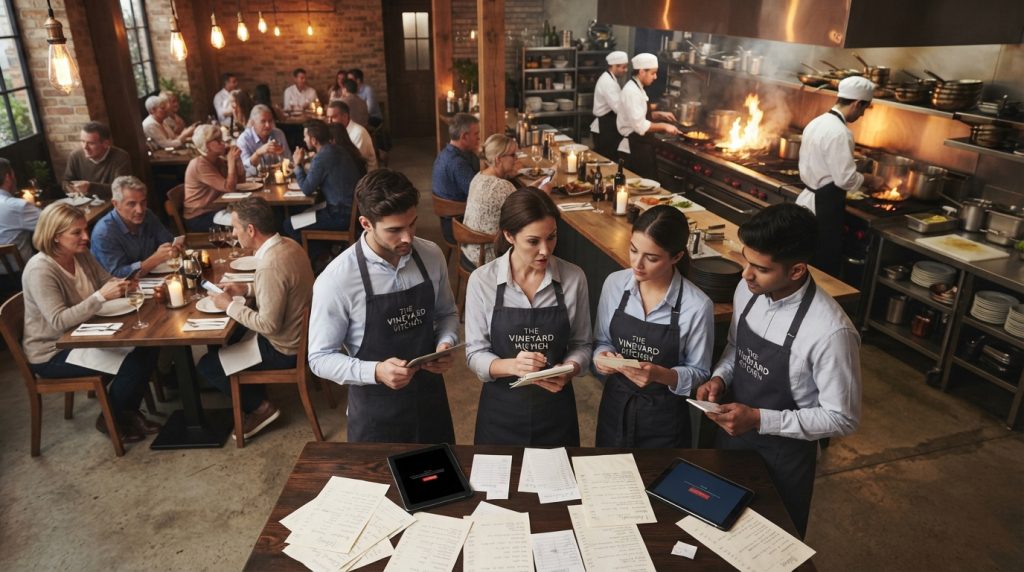
Many restaurants have a system for sales and another process for stock. Supplier orders may sit in email accounts. Invoices may be saved in different folders. Counts may be completed on paper and entered later.
Each gap creates a chance for delay or error. A manager may order too much because the current stock figure is unclear. Another venue may order too little because a sales report is not linked to purchasing activity.
- Staff spend time copying information between systems.
- Stock counts are delayed or completed in different formats.
- Purchasing decisions rely on memory rather than current data.
- Price changes are harder to review across suppliers.
- Perishable goods may be ordered without enough demand context.
- Management has less confidence in cost of goods reporting.
Integration does not replace good operating discipline. It gives your process a stronger information flow so staff can apply that discipline with less manual work.
How a connected stock procurement workflow works
A practical workflow begins with the information already created by your restaurant. Sales, recipes, stock counts, deliveries and supplier records each add context.
- Capture sales activity. Review menu and item sales for the relevant venue and period.
- Compare expected and available stock. Check current quantities against usage, par levels and upcoming demand.
- Identify purchasing needs. Separate urgent shortages from routine replenishment.
- Prepare supplier orders. Use agreed supplier details, pack sizes and purchasing rules.
- Receive and verify goods. Check deliveries against what was ordered and record variances.
- Review the result. Compare stock movement, cost goods and waste so the next order improves.
This process helps restaurants move from reactive ordering to controlled inventory management. The best result is not more data. It is a clearer decision at the right time.
Connect sales data with inventory management
Sales data can help you understand how quickly ingredients and menu items are moving. It can also show changes in demand by day, service period or venue.
Used carefully, this information supports more effective inventory management. It helps your team question unusual stock movement and investigate differences between expected usage and actual counts.
From menu sales to ingredient demand
A menu item may use several ingredients. When sales are reviewed alongside recipes and stock records, operators can form a clearer view of likely usage.
This is especially useful for restaurants managing fresh food, multiple service periods or a wide menu. It can support better preparation, ordering and stock rotation.
Use data as a decision aid
Real-time data is valuable only when the underlying process is reliable. Counts must be completed consistently. Items need clear names and units. Staff need to know who reviews exceptions.
Do not treat a dashboard as a substitute for an operating process. Use it to focus attention on the items, suppliers and locations that need action.
Make your sales data more useful
Hospoware can help you map the connection between your sales information and stock procurement workflow.
Improve low-stock visibility before service is affected
Low-stock visibility gives managers time to respond. The response may be a supplier order, a substitution, a menu adjustment or a conversation with the kitchen team.
Without reliable inventory management, a shortage may be discovered during preparation. That can create pressure for staff and affect customers.

Set useful thresholds
Par levels should reflect demand, delivery timing, storage space and the shelf life of each item. One rule rarely suits every ingredient.

Prioritise exceptions
A long item list can hide urgent needs. Give attention to low-stock items, high-value goods and ingredients linked to important menu sales.
Use inventory supplier integration to control purchasing
Inventory supplier integration brings supplier information closer to the stock decision. It can help your team work from consistent item details, ordering rules and delivery information.
The value depends on the quality of your supplier records. Product names, pack sizes, units, prices and delivery terms should be reviewed before a system connection is treated as dependable.
What to check before connecting a supplier
- Are supplier item names consistent with your internal stock list?
- Are purchase units different from recipe or usage units?
- Can staff identify substitutions and discontinued items?
- Who approves changes to price, pack size or supplier status?
- How will delivery shortages and invoice differences be recorded?
A strong inventory supplier integration process makes the next action clear. It should not create another place for staff to search.
Make purchasing decisions with better cost context
Purchasing is not only about the lowest listed price. You also need to consider pack size, usable quantity, delivery cost, quality, shelf life and supplier reliability.
When stock and sales information are reviewed together, you can ask better questions. Are you buying to meet real demand? Are items being over-ordered because of an inaccurate count? Is a price change affecting your cost goods?
Protect cost of goods sold visibility
Cost goods sold is affected by purchases, stock movement, waste, transfers and closing stock. A connected process helps you investigate these movements with less manual effort.
It does not remove the need for reconciliation. It gives your management team a clearer base for reviewing food costs and operational performance.
Practical test: If a manager cannot explain why an item was ordered, used, wasted or adjusted, your inventory management process needs a clearer audit trail.
Restaurant inventory use cases that benefit from integration

Single-site cafés
A café can use a connected process to review fast-moving items, delivery timing and daily demand before placing orders.

Multi-site restaurants
Groups need consistent item records and clear responsibility. Integration can support a common process while allowing each venue to manage local needs.

Waste-focused operators
Operators seeking to reduce waste can compare purchasing, usage and disposal patterns to find process improvements.
Capabilities to prioritise in inventory management software
When comparing software, focus on the workflow rather than a long feature list. The right system should support the decisions your staff make every day.
Data connection
- Sales data can be reviewed with stock information.
- Item records use consistent names and units.
- Relevant systems can exchange information securely.
Operational control
- Managers can see low-stock exceptions.
- Purchasing rules are clear to staff.
- Orders and deliveries can be checked against expectations.
Management insight
- Cost goods movement can be reviewed.
- Waste and variances can be investigated.
- Reports support practical purchasing decisions.
How to evaluate an integration before you commit
Ask vendors to explain the complete process. Do not assess an integration from a sales slide alone.
| Evaluation area | Question to ask | Why it matters |
| Data flow | Which information moves between systems? | You need to know whether the connection supports your actual workflow. |
| Timing | When is information updated? | Stock decisions depend on timely information. |
| Exceptions | How are errors, substitutions and shortages handled? | Real operations rarely follow a perfect path. |
| Ownership | Who checks and approves changes? | Clear responsibility protects data quality. |
| Support | What help is available during implementation? | A workable process matters as much as the software. |
Data quality is the foundation of effective inventory
Integration cannot correct poor source data by itself. If the same ingredient appears under several names, your reports may split the activity across multiple items.
Start with a controlled item list. Define units, supplier references, storage locations and preferred purchasing information. Remove duplicates where appropriate.

Standardise items
Use clear item names and consistent measurement rules across purchasing, recipes, stock counts and reporting.

Assign ownership
Nominate the people responsible for item changes, supplier updates, stock adjustments and approval of purchasing records.
Reduce waste through a tighter purchasing process
Food waste can come from over-ordering, poor storage, preparation errors, damaged goods, expired items or demand changes. Inventory management helps you see the pattern, but your team must still act on it.
Review waste by item, service period and cause. Compare it with sales and purchasing activity. A recurring waste issue may point to an incorrect par level, a pack size problem or a training gap.
Use inventory reviews to improve the next order
- Record waste close to the time it occurs.
- Separate unavoidable trim from preventable loss.
- Compare ordered quantities with actual usage.
- Review storage and rotation practices for perishable goods.
- Adjust purchasing decisions after confirming the cause.
Small improvements in ordering and handling can protect your bottom line. The goal is not to cut every stock buffer. The goal is to hold the right stock for the service you plan to deliver.
Implement restaurant inventory procurement integration step by step
A staged implementation gives your staff time to understand the new process. It also helps you test data quality before expanding the connection.
- Map the current process. Document how sales, stock counts, purchasing and deliveries are handled today.
- Define the first use case. Choose one measurable priority, such as low-stock visibility or supplier order preparation.
- Clean key records. Review ingredients, items, units, suppliers and locations.
- Set responsibilities. Decide who counts stock, approves orders and checks variances.
- Test a limited workflow. Use a suitable venue, category or supplier group before broader rollout.
- Train staff at the point of work. Show the process using real items and realistic service conditions.
- Review results. Track time spent, stock variances, waste and purchasing accuracy.
- Expand carefully. Add locations, suppliers or workflows after the first process is stable.
Choose a system that fits your management process
The best inventory management system is the one your team can use consistently. A technically capable product will not deliver value if counts are skipped or supplier records are unclear.
Signs of a strong fit
- It reflects how your venues actually purchase and receive goods.
- It gives managers useful information without unnecessary complexity.
- It supports a clear stock procurement workflow.
- It allows your team to review cost goods and waste causes.
- It has a sensible implementation path.
Warning signs
- The vendor cannot explain the data flow in plain language.
- Important workflow steps depend on manual re-entry.
- Supplier and item records are treated as an afterthought.
- The product promises results without discussing process quality.
- Your staff cannot see how the system fits daily work.
How Hospoware supports connected hospitality operations
Hospoware is built around the operational reality of hospitality businesses. The focus is on reducing friction between the systems and processes that operators rely on.
For your restaurant, the right starting point may be a review of sales information, inventory management, supplier records or purchasing responsibility. The scope should follow your business needs.
Menu and sales context
Use the Menumiz solution as a starting point for understanding how menu activity may fit into your wider operational process.
Hospitality operations
Explore Hospoforce when your review includes staff coordination and the people who complete daily management tasks.
Supplier relationships
Review Hospomarket when supplier purchasing and marketplace processes are part of your integration discussion.
Find the right starting point
Share your venue type, current systems and main operational constraint. We can help you frame the next practical step.
Who restaurant inventory management integration is for
This approach suits operators who need a more dependable link between what they sell, what they hold and what they buy.
- Independent restaurants with a growing menu or busy service schedule.
- Cafés managing fresh food, beverages and frequent supplier deliveries.
- Venue groups seeking more consistent management across locations.
- Franchise teams working with shared purchasing standards.
- Hospitality businesses reviewing food costs and waste.
- Operators replacing disconnected spreadsheets and manual processes.
It may not be the right first project if your item list is uncontrolled or your stock count process has no clear owner. In that case, clean the basics while assessing the technology.
Build a practical business case for integration
Do not measure value only by the price of software. Include the time your staff spend counting, copying, checking and correcting information.
Also consider the cost of stock discrepancies, emergency purchases, avoidable food waste and unclear supplier pricing. These costs may not appear in one report, but they affect the bottom line.
Useful questions for your management team
- How many hours are spent each week on manual inventory tasks?
- How often are urgent supplier orders needed?
- Which items create the most waste or stock variance?
- How quickly can you identify a purchasing issue?
- Which reports are trusted, and which require manual checking?
- What would a better process allow your managers to do instead?
A clear baseline helps you judge progress. It also keeps purchasing decisions focused on operational improvement rather than feature comparison alone.
Restaurant inventory procurement integration FAQs
What is restaurant inventory procurement integration?
It connects relevant sales, stock and supplier purchasing information so your team can review demand, identify stock needs and make better purchasing decisions.
How can integration help restaurants reduce waste?
It can make purchasing and stock movement easier to review. Your team can compare ordered quantities, usage, waste and demand, then adjust the process when a pattern is confirmed.
Does integration remove the need for stock counts?
No. Stock counts remain important. Integration helps you use count information alongside sales, supplier and purchasing data.
What should I prepare before speaking with a provider?
Prepare a list of current systems, key suppliers, stock locations, item categories and the main problems you want to solve. A simple process map is useful.
Can a small restaurant benefit from inventory management software?
Yes, if the software supports a real operational need. A small venue should start with one clear workflow and avoid paying for complexity it will not use.
Plan your next inventory integration step
Restaurant inventory procurement integration should make daily work clearer. Start with the link that creates the most friction between sales, stock and supplier purchasing.
Hospoware can help you assess that link and define a practical path for your hospitality business in Australia. Bring your current process, your questions and the outcome you want to improve.
Move from disconnected data to clearer decisions
Review the Hospoware platform and identify where connected inventory management can support your operation.
Bring sales, stock and purchasing into one clearer process
Reliable inventory management is not about counting more often for its own sake. It is about giving your team useful information before a purchasing decision is made.
When sales activity, stock visibility and supplier purchasing work together, managers can respond with greater control. That can support better cost goods review, less avoidable waste and a more consistent process across your restaurant.
Start with one workflow. Define the data it needs. Give staff clear ownership. Then build from evidence.

Make the next decision clearer
A practical conversation can help you separate the urgent workflow problem from the technology assumptions around it.
Metadata link: /restaurant-inventory-procurement-integration/